
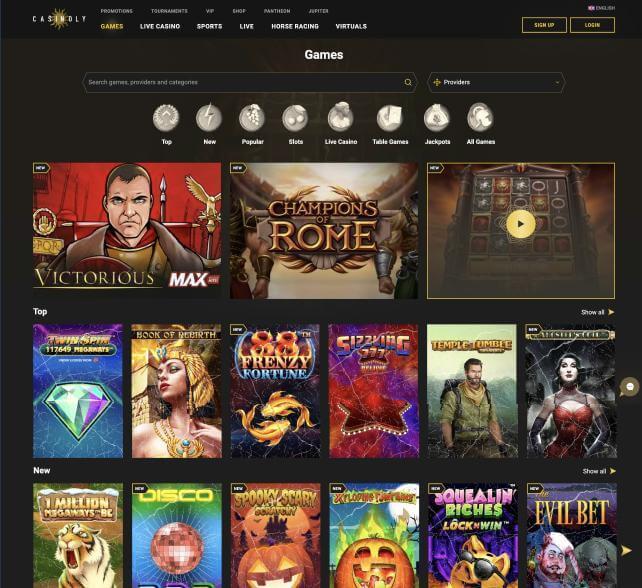
I have devoted a fair amount of time trying casino apps on various handsets across Ireland, and I continue coming back to the Casinoly Casino mobile app whenever I want a reliable slot session away from my laptop. The app bundles the full slot catalogue into a touch‑friendly package that runs quickly, remembers my preferences, and manages euro transactions without routing me to a separate web page. I created this guide to walk you through everything that matters before you download it, from device compatibility and installation steps to the in‑app features that truly make a difference when you are turning reels on a smaller screen.
Why I Trust the Casinoly Casino Mobile App for Slot Play
I initially tested the Casinoly Casino mobile site through my phone browser, and while the responsive design worked, the native app gave me a visibly smoother experience. The app stores my login securely, so I can jump straight into a game with a single tap instead of inputting credentials each time. It also keeps the slot reels scaled perfectly to my screen without the address bar and browser buttons eating into the display area. For anyone in Ireland who plays regularly, that extra bit of screen real estate makes a tangible difference, especially on older phones where every millimetre counts.
Another reason I rely on the app is the way it manages push notifications. I can configure alerts for new slot releases or tournament reminders without having to open emails. The notifications are optional and I have complete control over them in the settings, but they have saved me from missing a few limited‑time slot races that I would have overlooked otherwise. The app also seems to cache game assets more aggressively than the mobile browser, so once I have loaded a slot a couple of times, subsequent launches are almost instant even on a patchy mobile network in rural parts of Ireland.
I also value that the app integrates with the device‑level biometrics on both Android and iOS. Instead of entering a password every time I want to check my balance or make a quick deposit, I use my fingerprint or face scan. That small convenience adds up when you are hopping between short slot sessions during a commute or a lunch break. From a practical standpoint, the app simply removes the friction that a mobile browser introduces, and that is why I endorse it to anyone who plays slots on the go.
Device Compatibility and System Requirements
Before you consider any download, I advise confirming that your phone or tablet fulfills the minimum operating system requirements. Based on my own testing and the technical notes I have reviewed, the Casinoly Casino app generally demands Android 8.0 or newer and iOS 13 or later. These are fairly modest thresholds that cover most devices released in the last five to six years, but I still advise checking the exact version number on the official Casinoly site because requirements can change with major app updates. Running an older OS version is the most common reason I see for installation failures among Irish players.
Android Prerequisites and System Fragmentation
On Android, the app is distributed as an APK file that you sideload directly from the Casinoly website. Because the app is not listed on the Google Play Store, your device must allow installations from unknown sources. I have installed the APK on a Samsung Galaxy S21 running Android 12, a OnePlus Nord with Android 11, and even an older Huawei P20 Lite with Android 9, and the app performed consistently across all three. The key is having at least 150 MB of free storage for the initial installation, plus additional space for cached game data that can expand to a few hundred megabytes depending on how many slots you play.
APK File Security and App Permissions
When you install the APK, your device will request permissions like storage access and the ability to install unknown apps. I always verify that the file I downloaded corresponds to the official Casinoly domain and has not been tampered with. The app itself does not request invasive permissions beyond what is needed for push notifications and secure storage, and I have never seen it seek access to my contacts or call logs. Once installed, the app runs inside a sandboxed environment that honors Android’s standard security model.
iOS Requirements and App Store Availability
For iPhone and iPad users, the Casinoly Casino app is typically available through the Apple App Store, which simplifies the installation process considerably. I have operated it without issues on an iPhone 13 with iOS 16 and an older iPad Air 2 that I keep updated to iOS 15. The App Store listing clearly indicates the required iOS version, and Apple’s review process adds an extra layer of confidence that the app meets baseline privacy and performance standards. If you cannot find it in the Irish App Store, the Casinoly support team can offer a direct link, and I have found their response time to be under an hour during business hours.
Slot Gameplay: Performance, Graphics, and Mobile‑Friendly Gaming
When I launch a slot on the Casinoly Casino app, the first thing I see is how rapidly the reels show up. The app uses a smart loading sequence that fetches the game engine first and then loads the high‑resolution assets, so I can begin playing before every animation is fully loaded. On a stable Wi‑Fi connection, most slots are ready in three to five seconds, and even on 4G mobile data I seldom wait longer than eight seconds. The frame rates are consistent because the app transfers rendering to the device GPU, and I have not experienced stutter on any phone from the last three years.
Touchscreen Controls and Spin Mechanics
Slot controls are reworked for touch input. The spin button is big and positioned at the bottom right where my thumb naturally falls. I can also drag down on the reels to spin, which feels more engaging than hitting a button. The bet adjustment panel slides up from the bottom and lets me adjust a slider or choose preset bets, and the autoplay settings are tucked into a menu that I can adjust with a few taps. Everything is built so that I can play one‑handed, which is crucial when I am on a bus or with a coffee in hand.
Load Times and Data Usage
I measured the data consumption of several popular slots using the app’s built‑in network activity monitor on Android. A typical five‑minute session on a medium‑volatility slot consumed between 8 MB and 15 MB of data, based on the complexity of the animations. Jackpot slots with live tickers used slightly more, around 20 MB in the same period. These figures are modest enough that a monthly mobile data allowance of a few gigabytes can support dozens of sessions. The app also compresses assets after the first load, so playing again a slot uses considerably less data than the initial download.
Starting Out with Registration and Logging In
Once the app is downloaded, the first screen you see will ask you to either log in or create an account. I have set up a new Casinoly account entirely from the mobile app, and the process took me about three minutes. The registration form asks for standard details like your name, date of birth, email address, and phone number, and you will also choose your preferred currency, which for Irish players should be euro to avoid conversion fees.
Creating an Account from the App
Tap the registration button and fill in each field carefully. I always verify my email address because that is where the verification link lands. After submitting the form, the app will send a confirmation message to your inbox. Clicking that link activates your account and you can then log in immediately. The app also offers a quick registration option that uses your mobile number and a one‑time passcode, which I found useful when I was setting up an account on a new phone without access to my email client.
Confirming Your Identity for Irish Players
Like all regulated online casinos serving Ireland, Casinoly requires identity verification before you can withdraw winnings. The app lets you upload documents directly through a secure portal. I used my Irish passport and a recent utility bill, and the verification team approved them within a few hours. You can take photos of your documents using the phone camera, and the app automatically crops and aligns them. I recommend completing this step early so that your first withdrawal is not delayed by pending checks.
Payment and Safety on the Smartphone App
Handling money through the Casinoly Casino app feels every bit as safe as the desktop cashier, and I put in funds and cashed out using the identical methods I could on a computer. The app accepts debit cards, e‑wallets like Skrill and Neteller, and bank transfers, all completed in euro for Irish accounts. Every transaction is secured with TLS, and the app displays a padlock icon in the cashier section so I can easily confirm the connection is protected before inputting sensitive details.
Adding Funds and Cashing Out in Euro
To make a deposit, I press the wallet icon and select my chosen method. The app recalls my last used option and automatically fills the amount field with common values like €20, €50, or €100. I can also type a custom amount. Deposits are processed instantly, and the funds show up in my balance before I so much as close the cashier. Withdrawals follow the same flow but demand that my account is fully verified. I submitted payouts directly from the app, and the pending period has been the same with the desktop site, typically processed within 24 hours for e‑wallets.
Profile Security Features
Beyond biometric login, the app offers two‑factor authentication that I am able to turn on from the account settings. Once activated, every login from a new device requires a code from an authenticator app or SMS. I also establish deposit limits and session reminders directly in the responsible gaming section, which is reachable from the bottom bar. The app logs me out automatically after a period of inactivity, and I am able to change that timeout in the settings. These layers provide me peace of mind when I am playing on a shared Wi‑Fi network or if my phone is https://www.tsn.ca/golf/lpga/leaderboard ever lost.
Adding the iOS App on iPhone and iPad
Apple users in Ireland enjoy a simpler path as the App Store takes care of distribution, verification, and updates automatically. I have installed the Casinoly Casino app on multiple iOS devices and the experience is similar to downloading any other app. The only caveat is that your Apple ID region must be set to Ireland or another supported country, and this most Irish players have already configured by default.
Finding the App on the App Store
Open the App Store and search for “Casinoly Casino” using the exact brand name. The official app should show near the top of the results with the recognizable logo. I always check the developer name listed below the app title to confirm it matches the casino operator. Tap the download icon, authenticate with Face ID, Touch ID, or your Apple ID password, and the app will install automatically. Once the icon appears on your home screen, you can open it and log in with your existing credentials or create a new account directly from the app.
Alternative Web App Installation
If for any reason the native iOS app is temporarily unavailable or you prefer not to install it, Casinoly Casino also supports a progressive web app that you can add to your home screen through Safari. I tried this method on an iPad where I wanted to keep the device storage lean. Tap the share icon in Safari and select “Add to Home Screen.” The shortcut behaves almost like a native app, launching in full‑screen mode and storing its own cache. The slot performance is nearly identical, though biometric login is limited compared to the native version.
Navigating the App: Home, Search Bar, and Title Filters
The app’s layout is structured around a bottom navigation bar that gives me one‑tap access to the lobby, my account, promotions, and support. I find the layout easy to use because the most important parts are always shown, and I never have to hunt through nested menus to find the slot catalogue. The design adapts well across different screen sizes, and the touch targets are big enough that I rarely hit the wrong button even on a compact phone.
Casino Lobby and Category Tabs
The main lobby presents a grid of slot thumbnails, and I can scroll horizontally through category tabs like new releases, jackpots, Megaways, and classic fruit machines. Each tab loads quickly because the app pre‑fetches thumbnail images in the background. I often utilize the provider filter to refine the selection to studios I prefer, such as NetEnt, Play’n GO, or Pragmatic Play, and the app saves my last filter choice between sessions. That small customization saves me from scrolling past hundreds of titles I am not looking for.
Employing the Search Bar Effectively
The search function sits at the top of the lobby and responds instantly as I type. I have employed it to find specific slots like Starburst or Book of Dead in under a second. The search also identifies partial titles, so typing “meg” brings up every Megaways slot in the library. I value that the app does not need me to hit a separate search button; results display as I type, which makes navigating on a small keyboard much faster.
Getting to Promotions and Support
From the bottom bar I can switch to the promotions page, which displays current offers adapted to my account. The app also embeds a live chat widget that puts me in touch with me to support without leaving the game I am playing. I have tried this while a slot bonus round was active, and the chat overlay did not affect the spin. The support team is on hand through the app during extended hours, and I have obtained answers to technical questions within a couple of minutes on most occasions.
Getting and Setting Up the Android App
Acquiring the Casinoly Casino app on an Android device entails a few more steps than a typical Play Store download, but the process is simple once you comprehend the sideloading workflow. I have guided several friends through it, and the entire sequence needs less than five minutes from start to finish. The most important rule is to only download the APK from the official Casinoly website, because third‑party repositories can bundle modified files that put your account at risk.
Getting Ready Your Device for Sideloading
Before you fetch anything, open your Android settings and go to the security or apps section. Depending on your manufacturer, you will find an option labelled “Install unknown apps” or “Unknown sources.” You must to grant this permission to the browser you will use to fetch the APK, such as Chrome or Samsung Internet. I always toggle the permission on right before the download and turn it off again immediately after installation to keep my device secure. Some Android skins also display a one‑time prompt when you open the downloaded file, so do not be alarmed if you see an additional confirmation dialog.
Step‑by‑Step APK Installation
Visit the casino casinoly app login website from your phone and search for the mobile app section, usually linked in the footer or the main menu. Tap the Android download button and wait for the APK file to finish downloading. I then swipe down the notification shade, tap the completed download, and follow the on‑screen prompts. The installer will show you the permissions the app requires, and once you accept, the installation completes in under a minute. After the app icon appears on your home screen, I suggest deleting the APK file from your downloads folder to free up space.
Confirming the Download Source
I make it a habit to double‑check the URL where I obtained the APK. The official Casinoly domain uses HTTPS and the download link should point to a subdomain or path that clearly belongs to the brand. If your browser warns you about an untrusted certificate or the file name looks generic, stop and reach out to customer support before proceeding. A legitimate APK will also be signed with a developer certificate that matches the publisher, and your device will show the publisher name during installation.
FAQ
Is the Casinoly Casino app complimentary to get?
Absolutely, the app is completely free to download on either Android and iOS. There is no fee for the APK file or the App Store listing. You simply need to fund your account if you want to play real‑money slots. I have never encountered any hidden fees related to the app itself, and it does not display third‑party advertisements that would generate revenue outside of the casino’s own promotions.
Is it possible to play for real money on the app in Ireland?
Definitely. The app is fully functional for real‑money play, and you can deposit, wager, and withdraw euro straight away. I have used my Irish debit card and an e‑wallet without any geo‑blocking issues. As long as you are present in Ireland and your account is verified, the app treats you precisely as the desktop site does, with the same game library and payment options available.
What steps should I take if the Android app will not install?
Firstly, confirm that https://www.reddit.com/r/podcasts/comments/1kjradg/best_podcasts_for_a_long_drive_maybe_about_the/ you have enabled installation from unknown sources for the browser you used to download the APK. Then check that your device runs Android 8.0 or higher and has at least 150 MB of free storage. If the installation continues to fail, delete the APK file, clear your browser cache, and download a fresh copy from the official Casinoly website. Corrupted downloads are rare but can happen on unstable connections.
How much mobile data does the app use a lot of mobile data?
According to my measurements, a five‑minute slot session typically consumes between 8 MB to 20 MB of data. The initial download of a new game can consume an additional 30 MB to 60 MB as assets are cached, but subsequent loads require far less. If you have a limited data plan, I advise downloading a few chosen slots over Wi‑Fi first so that mobile data is solely used for gameplay communication.
Is it possible to access the same account on desktop and mobile?
Absolutely, your Casinoly Casino account is unified across all platforms. I frequently switch between the app on my phone and the desktop site on my laptop, and my balance, game history, and active bonuses sync instantly. There is not any need to create a separate mobile account, and any withdrawal requests you initiate from the app will appear in your desktop transaction log as well.
How can I update the app?
On iOS, updates are delivered through the App Store similar to any other app, and you can enable automatic updates in your device settings. On Android, you should visit the Casinoly website periodically and download the latest APK. The app itself will usually display an in‑app notification when a new version is available, and I recommend updating promptly to gain from performance improvements and security patches.

Is it true that my personal information safe on the mobile app?
The app uses the same encryption standards as the computer platform, including TLS for all data in transit. Biometric login provides an extra layer of protection on supported devices, and the app does not store payment card details in plain text. I have reviewed the privacy policy and confirmed that personal data is handled in compliance with GDPR, which applies to Irish users. You can also enable two‑factor authentication for additional account security.